
Understanding Invoice Fields, Totals, and Due Dates
This article documents the fields directly visible on an Invoice, distinguishing where possible whether each is user-entered, inherited, editable, read-only, calculated, or status-driven.
Who this is for: Owners or staff who need to read Invoice fields and understand what the totals represent.
Before you begin
Section titled “Before you begin”- An existing synthetic Invoice.
Observed fields
Section titled “Observed fields”- Invoice number — read-only, assigned by the system.
- Bill To (customer) — inherited from the source Work Order or Estimate; read-only on the Invoice.
- Service / Property — inherited; read-only on the Invoice.
- Source (Estimate, Work order, Origin) — inherited references; read-only.
- Due date — user-entered; editable while the Invoice is in Draft; status-driven display once saved.
- Currency — read-only in this capture.
- Created / Updated — read-only, system timestamps.
- Line items (service, quantity, unit of measure, unit price, line total) — inherited snapshot from the source Work Order; read-only on the Invoice detail view in this capture.
- Subtotal, Sales tax, Total — calculated by deterministic finance logic; read-only.
- Paid, Balance due — calculated, status-driven; read-only.
- Payment status — status-driven label (for example, Unpaid).
- Notes / Terms & conditions — carried-over text fields, shown as read-only on the Invoice detail view in this capture.
- Payment history panel — visible; empty when no payments are recorded.
- Attachment controls — visible; not exercised in this capture.
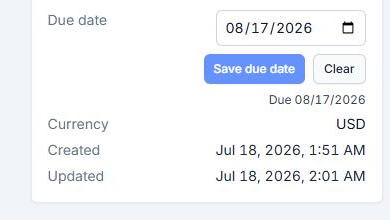
Invoice Details fields: due date, currency, created and updated timestamps.

The line items snapshot on an Invoice.
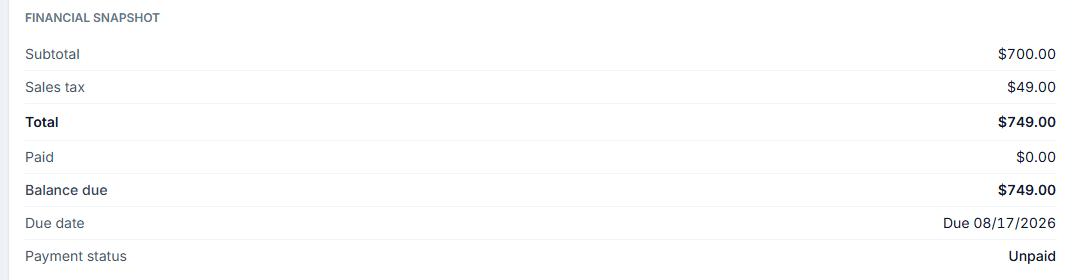
The financial snapshot on an Invoice.
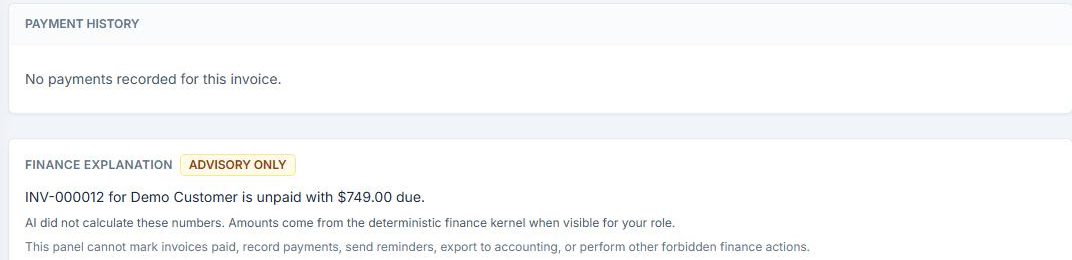
The payment history panel and the advisory-only finance explanation panel.
Permanent financial boundary
Section titled “Permanent financial boundary”User and governed workflow records (Estimates, Work Orders) provide the inputs. Deterministic OperelliOS logic computes the official Invoice totals. The AI assistant surfaced on the Invoice view does not own prices, taxes, discounts, balances, due dates, or totals — its advisory panel states that it did not calculate the displayed numbers and cannot mark invoices paid, record payments, send reminders, or export to accounting. Displayed advisory information is not a separate financial truth from the deterministic total.
Expected result
Section titled “Expected result”You can identify which Invoice fields are inherited, editable, or calculated, and you treat deterministic totals as the official financial values.
Warnings and notes
Section titled “Warnings and notes”- This article does not claim tax-jurisdiction correctness, accounting compliance, revenue recognition, legal enforceability of payment terms, automatic late fees, or overdue aging calculations beyond what was directly visible.
- Field behavior is documented only for the single synthetic Invoice directly captured in this batch. Role-based or configuration-based differences were not tested.